
The landscape of web development is undergoing a profound transformation, driven by the rapid advancements in artificial intelligence. Today, the once time-consuming and often repetitive process of converting design concepts into functional code is being revolutionized by AI-powered tools. DesignToCodeAI stands at the forefront of this innovation, offering a sophisticated platform that seamlessly bridges the gap between visual design and production-ready code. This advanced AI-powered design to code conversion system empowers developers, designers, and agencies to accelerate their workflows, enhance accuracy, and bring digital visions to life with unprecedented speed and efficiency.
Table of Contents
- What is AI-Powered Design to Code and Why Does it Matter for Modern Web Development?
- How DesignToCodeAI Transforms Your Designs into Production-Ready Code
- Unleashing Creative Potential: Converting Diverse Design Inputs to Code
- Ensuring Quality: Responsiveness, SEO, and Pixel-Perfect Accuracy in AI-Generated Code
- Practical Applications and Real-World Impact for Developers and Designers
- Understanding DesignToCodeAI’s Flexible Point System and Transparent Pricing
- Data Privacy and Security: Your Designs and Code are Safe with DesignToCodeAI
- Latest Innovations and Future of AI Design to Code
- Frequently Asked Questions About AI-Powered Design to Code
- Conclusion: Embrace the Future of Web Development with AI
What is AI-Powered Design to Code and Why Does it Matter for Modern Web Development?
AI-powered design to code represents a paradigm shift in how digital interfaces are built, automating the translation of visual concepts into functional programming languages. This innovative approach leverages artificial intelligence to interpret design inputs and generate the corresponding front-end code, significantly reducing manual effort and development cycles.
Defining AI Design Conversion: Bridging the Gap Between Vision and Code
AI design conversion is the process where artificial intelligence analyzes visual design assets and automatically generates valid, semantic code or platform-specific templates. This technology acts as a bridge, transforming static or interactive designs into dynamic web elements without requiring a developer to write every line of code manually. The AI typically employs advanced computer vision models to understand the visual hierarchy, component structure, and styling attributes within a design. Complementary Natural Language Processing (NLP) models can then interpret additional instructions or contextual cues provided by the user, leading to a more nuanced and accurate code generation.
The Evolution of Web Development Workflows with AI Automation
The journey from design to code has historically been fraught with challenges. Before the advent of AI, designers would meticulously craft mockups in tools like Photoshop or Sketch, which would then be handed off to developers. This manual translation process was often a bottleneck, prone to misinterpretations, pixel discrepancies, and lengthy iteration cycles. Developers spent considerable time on boilerplate coding, translating visual elements into HTML, CSS, and JavaScript. AI automation fundamentally reshapes this workflow, making it more fluid and efficient.
With AI, the process becomes less about manual translation and more about intelligent interpretation. AI tools can rapidly prototype, allowing designers and developers to test concepts faster, iterate on feedback efficiently, and achieve pixel-perfect results with greater consistency. This acceleration means design changes can be implemented almost instantly, fostering a continuous feedback loop and significantly reducing time-to-market for new features or entire products. According to industry standards, such automation contributes to faster deployment, which is a key factor in maintaining competitive advantage in the rapidly evolving digital landscape of 2026.
Core Benefits: Speed, Accuracy, and Cost Efficiency
The advantages of integrating AI-powered design to code solutions into modern web development workflows are multifaceted and profound:
- Speed: Designs can be converted into code in minutes, not hours or days, drastically cutting down development timelines. For instance, a typical landing page design that might take a human developer half a day to code can be converted by DesignToCodeAI in a fraction of that time, freeing up valuable developer resources for more complex logic or unique functionalities. This is particularly beneficial for rapid prototyping and meeting tight deadlines.
- Accuracy: Advanced AI systems like DesignToCodeAI aim for pixel-perfect conversions, ensuring the generated code precisely matches the original design, reducing the need for extensive manual adjustments. This eliminates the common frustration of “design-to-development” discrepancies, where the coded output doesn’t quite match the designer’s vision.
- Consistency: AI ensures uniform application of styles and layouts across different components and pages, maintaining design system integrity. This is especially crucial for larger projects with multiple developers, where manual coding can sometimes lead to stylistic inconsistencies.
- Cost Efficiency: By automating a significant portion of the coding process, businesses can reduce labor costs associated with front-end development. This allows smaller teams to achieve more with fewer resources, or larger teams to allocate developers to more strategic, high-value tasks.
- Responsiveness: AI-generated code often incorporates modern responsive design principles, ensuring websites look great and function flawlessly on any device, from the largest desktop monitors to the smallest mobile screens. This built-in responsiveness saves considerable time typically spent on manual media query adjustments.
How DesignToCodeAI Transforms Your Designs into Production-Ready Code
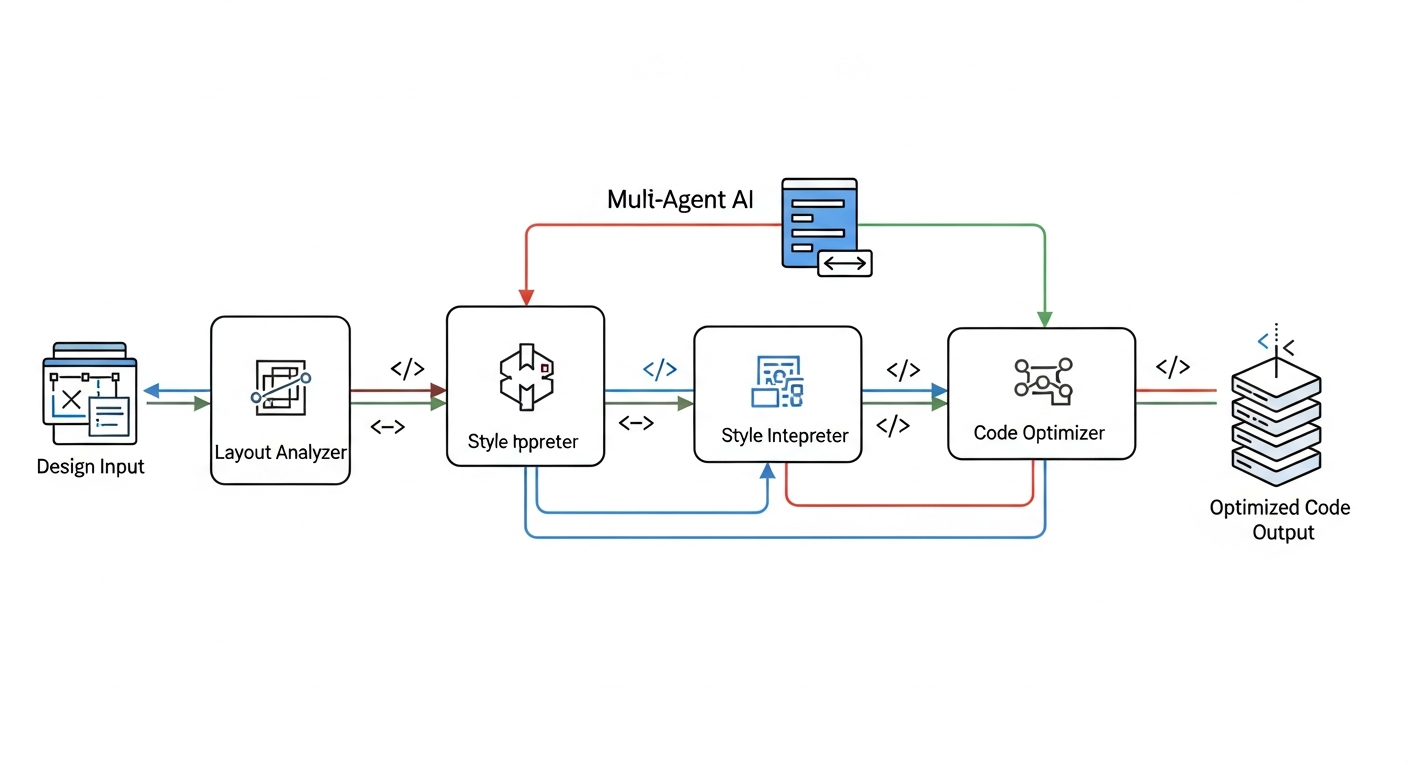
DesignToCodeAI utilizes a cutting-edge multi-agent AI system to manage every step of the design conversion process with unparalleled precision and speed. This sophisticated architecture ensures that your visual concepts are accurately translated into high-quality, production-ready web code.
Understanding the Multi-Agent AI System and Its Precision
DesignToCodeAI operates on a specialized multi-agent AI system where distinct AI agents collaborate to perform specific tasks. This collaborative approach is a key differentiator, as it allows for a more granular and precise understanding of complex designs compared to a monolithic AI system. Each agent is specialized:
- Layout Analysis Agent: Focuses on interpreting the overall structure, grid systems, and positioning of elements.
- Styling Interpretation Agent: Identifies colors, fonts, shadows, borders, and other visual attributes.
- Component Recognition Agent: Detects common UI components like buttons, navigation bars, forms, and cards, mapping them to standard code patterns.
- Code Generation & Optimization Agent: Translates the analyzed design into clean HTML, CSS, and JavaScript, while also optimizing for performance, responsiveness, and semantic correctness.
- Review & Refinement Agent: Cross-references the generated code with the original design and applies iterative improvements based on user feedback or internal quality checks.
This intelligent division of labor leads to more accurate, structured, and consistent output across all generation modes, ensuring pixel-perfect results that are robust, maintainable, and adhere to modern web standards.
Supported Input Formats: From Visuals to Website URLs
DesignToCodeAI offers extensive flexibility in the types of design inputs it accepts, accommodating various professional workflows. Users can upload:
- Design Images: High-resolution PNG or JPG format files, up to 20MB in size, exported from design tools like Adobe XD, Sketch, or even custom mockups.
- Screenshots: Visual captures of existing web elements or full pages that users wish to convert or redesign.
- Figma Links: Direct integration with Figma allows the AI to interpret designs from the popular collaborative design platform.
- Website URLs: A significant recent enhancement (version 1.6.4) introduced support for generating designs directly from any website URL for HTML, Elementor templates, and redesign workflows. This allows for analyzing existing live pages for inspiration or complete overhauls.
Choosing Your Output: Pixel-Perfect HTML/CSS/JS or Elementor Templates
The platform provides two primary output formats, catering to different development needs:
- Pixel-Perfect HTML: DesignToCodeAI generates clean, semantic HTML with optimized Tailwind CSS and JavaScript. This output is meticulously crafted to precisely match your original design, featuring built-in responsive layouts and an SEO-friendly structure. The multi-block code output feature (introduced in version 1.6.2) provides structured HTML/CSS/JS separation in export mode, making the code easier to manage and integrate into larger projects.
- Elementor Template JSON: For the vast community of WordPress users, DesignToCodeAI can generate a single JSON file ready for direct import into Elementor via its Template Import option. This output preserves all styling, layout, and widget mapping, ensuring seamless integration into your WordPress site with minimal post-conversion adjustments.
The Intuitive 3-Step Conversion Process: Upload, Convert, Refine, Export
Converting your designs into code with DesignToCodeAI is designed to be straightforward and user-friendly, following an intuitive three-step process:
- Upload Design or URL: Begin by simply dragging and dropping your design image, pasting a Figma link, or entering a website URL. You then select your desired output format (HTML or Elementor) and customize preferences, such as the number of AI iteration count to guide the conversion process.
- AI Conversion: The multi-agent AI system springs into action, analyzing the layout, typography, and components of your input. It then generates the pixel-perfect HTML or Elementor Template JSON. For a completely modern overhaul, the “Redesign” option can be selected when using a website URL as input, allowing the AI to generate a fresh, professional layout inspired by the original.
- Refine & Export: Review the generated code in the advanced live preview engine, which offers faster rendering and reliable real-time output visualization. You can make further refinements using AI iterations or chat prompts, adjusting the code to meet precise specifications. Once satisfied, you can export your clean, production-ready HTML or Elementor Template JSON for immediate use in your projects.
New users receive 500 free points upon signup to try the service, making it easy to Start Generating today and experience the future of web development.
Unleashing Creative Potential: Converting Diverse Design Inputs to Code
DesignToCodeAI empowers creative teams and ambitious minds to transform a wide array of design concepts into functional web assets. The platform’s versatility in handling various input formats ensures that your preferred design workflow can be seamlessly integrated with AI-powered code generation, maximizing efficiency and creative output.
Converting Design Images and Screenshots to HTML and Elementor
One of the most accessible entry points for AI design conversion is through image uploads. Whether you have a high-fidelity design exported from Adobe XD, Sketch, or even a simple screenshot of a web page you admire, DesignToCodeAI can process PNG or JPG files up to 20MB. The AI meticulously analyzes these visual inputs to reconstruct layouts, identify distinct UI components, and translate styling cues into clean HTML with optimized Tailwind CSS or an Elementor Template. This functionality is invaluable for developers needing to quickly convert client-provided mockups into working prototypes or for designers wanting to see their static visuals come to life as interactive web pages.
Seamless Figma to HTML and Elementor Template Conversion
Figma has become a cornerstone for modern UI/UX design, known for its collaborative features and robust design system capabilities. DesignToCodeAI provides a direct pathway from Figma designs to code. By simply pasting a Figma link, the AI can interpret the intricate details of your design, including components, auto-layouts, typography, color variables, and styling specifications. This direct integration streamlines the design-to-development handoff, ensuring that the integrity of the original Figma design is maintained in the generated HTML or Elementor Template JSON. This capability significantly reduces the manual translation effort often associated with converting complex Figma files, allowing developers to implement designs faster and with greater fidelity.
The Power of Website URL Input for Redesign and Inspiration Workflows
A recent and powerful addition to DesignToCodeAI’s capabilities (version 1.6.4) is the ability to generate designs directly from any website URL. This feature opens up new possibilities for web development and design innovation:
- Redesign Workflows: Provide a URL of an existing website, and the AI can analyze its current structure, content, and styling to generate a fresh, modern redesign. This is ideal for businesses looking to update their online presence quickly and efficiently, bypassing the need to start from scratch. The AI intelligently identifies outdated design patterns and proposes contemporary alternatives, offering a significant time-saver for website overhauls.
- Inspiration and Learning: Developers and designers can input URLs of websites they find aesthetically pleasing or functionally impressive. The AI then deconstructs these sites into their core code, offering invaluable insights into how complex layouts and interactive elements are constructed. This serves as an exceptional learning tool and a foundation for generating new projects inspired by best-in-class examples.
- Competitive Analysis: Analyze competitors’ websites to understand their design patterns, user experience flows, and underlying code structures. This allows for generating alternative layouts or components that can give your projects a competitive edge, without requiring extensive manual reverse-engineering.
Expert Tips for Optimizing Design Inputs for AI Accuracy
While DesignToCodeAI’s multi-agent AI system is highly sophisticated, providing optimized inputs can further enhance the quality and accuracy of the generated code. Adhering to these best practices can significantly improve your conversion results:
- Clear and Organized Layout: Ensure your design has a clear, logical layout with distinct sections, components, and consistent spacing. Designs that follow established design system principles (like atomic design) often yield superior results, as the AI can more easily identify and map structured elements.
- High-Resolution and Crisp Images: For image uploads, use high-resolution PNG or JPG files to give the AI maximum detail to work with. Blurry or low-resolution images can lead to misinterpretations of text, icons, and intricate design elements. Aim for image dimensions that are representative of the final web output.
- Consistent Styling and Typography: Maintain consistent typography, color palettes, and spacing across your entire design. Avoid using too many different fonts or inconsistent color shades for similar elements. The AI thrives on patterns and consistency.
- Well-Organized Design Tool Layers: For designs created in Figma or similar tools, ensure that your layers are logically organized, grouped, and named appropriately. This helps the AI understand the relationships between elements and translates into cleaner, more semantic code. For example, grouping related elements like a button and its text.
- Multi-Section Conversion for Elementor: For complex, multi-section designs intended for Elementor Template JSON output, converting each major section separately often yields cleaner widget mapping and better results. This approach gives you more flexibility when editing inside Elementor, avoiding the complexity of a single, monolithic JSON file and simplifying future maintenance.
Ensuring Quality: Responsiveness, SEO, and Pixel-Perfect Accuracy in AI-Generated Code
A core promise of DesignToCodeAI is not just to generate code quickly, but to deliver high-quality, production-ready output that meets modern web standards. This includes ensuring responsiveness across devices, optimizing for search engines, and achieving pixel-perfect fidelity to the original design.
Crafting Responsive Layouts with Modern CSS (Flexbox/Grid)
In today’s multi-device world, responsive design is not merely a feature but a fundamental requirement for any successful website. DesignToCodeAI’s AI engine is meticulously trained to produce responsive layouts using modern CSS techniques, specifically Flexbox and CSS Grid. These powerful layout modules are the backbone of contemporary web design, allowing elements to dynamically adapt and rearrange based on the viewport size. This intelligent implementation ensures that the generated website dynamically adapts to various screen sizes, from the largest desktop monitors to tablets and mobile phones, providing an optimal viewing experience for all users. This eliminates the manual effort of writing complex media queries and ensures inherent mobile-friendliness, a critical factor for user experience and search engine rankings.
Semantic HTML for Enhanced SEO Performance and Accessibility
The code generated by DesignToCodeAI adheres strictly to semantic HTML best practices. Semantic HTML uses tags that convey meaning about the content they contain (e.g., <header>, <nav>, <article>, <footer>, <main>, <section>). This structured approach is crucial for SEO, as it helps search engines like Google understand the hierarchy, context, and relevance of your content, leading to better indexing and potentially higher ranking. Furthermore, semantic HTML significantly improves web accessibility, making websites usable for individuals with disabilities who rely on screen readers and other assistive technologies. By providing a clear and logical document outline, AI-generated code from DesignToCodeAI supports a more inclusive web.
Achieving Pixel-Perfect Conversion Accuracy with Advanced AI
DesignToCodeAI’s multi-agent AI system is specifically engineered to analyze design inputs with meticulous detail, aiming for pixel-perfect accuracy in its code conversion. This means that the generated HTML, CSS, and JavaScript or Elementor Template JSON will closely mirror the visual aesthetics, spacing, typography, and component placement of your original design. The AI’s continuous learning from vast datasets of designs and code enables it to recognize intricate patterns and subtle visual cues, translating them into precise code. While most outputs are production-ready, the system provides advanced tools to fine-tune results for even the most complex or nuanced designs, ensuring the final product meets your exact visual specifications.
Refinement Strategies: Iterations, Additional Instructions, and Live Previews
Achieving the perfect conversion, especially for highly customized or complex designs, sometimes requires a degree of refinement. DesignToCodeAI provides robust features to guide the AI and perfect the output:
- AI Iterations: Users can specify the number of AI iterations, allowing the system to make successive improvements based on initial feedback or desired complexity. Each iteration provides an opportunity for the AI to learn and adjust, honing the output closer to perfection.
- Additional Instructions: Detailed text prompts can be provided to guide the AI, such as specifying particular CSS properties, component behaviors, structural adjustments, or even semantic meanings for certain elements. This natural language input significantly enhances the AI’s ability to understand specific design intent.
- Advanced Preview Engine: The upgraded live preview system offers faster rendering and reliable real-time output visualization, allowing you to instantly see the effects of your refinements. Generated projects also include shareable preview links via DesignToCodeAI, facilitating seamless collaboration and feedback from team members or clients without needing to export the code.
A key strategy to consider for optimal results is to treat the AI as a highly skilled assistant. Providing clear, concise instructions and utilizing the iterative refinement process can transform a near-perfect output into one that precisely meets your project’s unique requirements. This proactive engagement ensures the AI understands your specific nuances, delivering customized and accurate results.
Practical Applications and Real-World Impact for Developers and Designers
The practical benefits of AI-powered design to code extend across various scenarios in web development, offering tangible improvements in efficiency, collaboration, and project delivery. DesignToCodeAI serves as a powerful ally for both individual freelancers and large creative teams, transforming how digital projects are conceived and executed.
Accelerating Prototyping and Minimum Viable Product (MVP) Development
For startups, product managers, and agile development teams, rapid prototyping is essential for validating ideas, testing user flows, and gathering early user feedback. DesignToCodeAI significantly accelerates this process by instantly converting design mockups into functional web pages. This allows teams to quickly build Minimum Viable Products (MVPs) without extensive manual coding, enabling faster market entry and iterative development cycles. Emma Rodriguez, a Product Manager at a startup, noted, “Amazingly accurate conversions. We use it for rapid prototyping and it has significantly boosted our iteration speed.” This acceleration translates directly into quicker feedback loops and a more agile development process, crucial for competitive markets.
Streamlining Client Project Delivery and Iteration Cycles
Freelance designers and web development agencies often face immense pressure to deliver projects quickly while maintaining high quality and adhering to client specifications. DesignToCodeAI streamlines the entire client project lifecycle, from initial concept to final delivery. Designers can present functional prototypes generated directly from their visuals, facilitating clearer communication with clients and securing faster approvals. Subsequent design changes, which are inevitable in most projects, can be rapidly converted and integrated, drastically reducing iteration cycles and ensuring higher client satisfaction. Sarah Johnson, a Freelance Lead Designer, highlighted that the service “has significantly reduced my development time. The AI’s understanding of various design systems is truly impressive!” For WordPress developers, the efficiency is equally transformative. Michael Chen, a WordPress Developer, praises the platform, stating, “The Elementor Template JSON export is flawless. I can take a Figma design and have it live on a WordPress site in under 10 minutes now.” This rapid deployment capability is invaluable for agencies and freelancers managing multiple client sites.
Modernizing Legacy Websites with AI Redesigns and Fresh Layouts
Many businesses operate with outdated websites that no longer meet modern aesthetic or functional standards, often due to significant accumulated technical debt or simply evolving design trends. The website URL input and redesign functionality of DesignToCodeAI offer a powerful solution for modernizing these legacy sites. By analyzing an existing website’s structure, content, and current design patterns, the AI can generate a fresh, professional layout, breathing new life into older platforms without a complete manual rebuild. This provides a cost-effective and time-efficient way to update a site’s UI/UX to contemporary standards, improving user engagement and brand perception without the need for a full re-coding effort.
Common Mistakes to Avoid When Integrating AI into Your Development Workflow
While AI tools like DesignToCodeAI offer immense benefits, experienced developers often caution against certain pitfalls to ensure optimal results and avoid potential frustrations:
- Over-reliance without Thorough Review: Never deploy AI-generated code directly into production without thorough human review and testing. While AI aims for pixel-perfect accuracy, it is an assistant, not a replacement for human oversight. Always verify the code for responsiveness, functionality, and adherence to specific project requirements.
- Providing Poor Quality Input: The quality of the AI’s output is heavily influenced by the quality of its input. Providing low-resolution images, ambiguous design elements, or unclear textual instructions can lead to suboptimal or inaccurate code. Invest time in preparing clear, well-structured design inputs.
- Ignoring Refinement Tools: Neglecting to use iterative refinement and additional instructions can result in settling for ‘good enough’ instead of ‘pixel-perfect’ or precisely customized results. The chat interface and iteration count are powerful tools for guiding the AI to meet your exact specifications.
- Lack of Customization and Integration Planning: While AI provides a strong foundation, specific project requirements often demand custom tweaks or integration with existing systems. Always plan for manual adjustments for unique functionalities, highly personalized branding elements, or integrating the generated code into a larger application or CI/CD pipeline.
- Treating AI as a Black Box: Understanding the capabilities and limitations of the AI system, such as its ability to handle complex JavaScript interactions versus static layouts, helps in setting realistic expectations and effectively utilizing its strengths.
Understanding DesignToCodeAI’s Flexible Point System and Transparent Pricing
DesignToCodeAI operates on a flexible, transparent points-based system, allowing users to pay only for what they use without long-term subscriptions or hidden fees. This model ensures that both occasional users and high-volume professionals can find a suitable plan that aligns with their project needs and budget.
How Power Points Fuel Your Conversions and Iterations
Each design generation, whether it’s an HTML conversion, an Elementor Template, or a redesign workflow, consumes a certain number of Power Points. The cost per generation typically ranges from 300 to 500 Points, depending on the complexity of the design and the number of iterations selected. More complex designs or additional refinement iterations will naturally require more points. This system provides granular control over spending, as you only use points when you actively generate code. A significant advantage is that Power Points do not expire, ensuring that any purchased points remain available for your projects whenever you need them, providing long-term value.
Exploring Flexible Pricing Packs: Starter, Pro, and Power
DesignToCodeAI offers several Power Point packs designed to cater to different usage levels, from individual freelancers to busy agencies:
| Pack Name | Cost | Power Points | Approx. Conversions | Key Features |
|---|---|---|---|---|
| Starter Pack | $12.00 | 1500 | ~15 | HTML/CSS/JS + Elementor JSON, Website URL support, Redesign functionality, Priority email support |
| Pro Pack | $25.00 | 4000 | ~40 | HTML/CSS/JS + Elementor JSON, Website URL support, Redesign functionality, Priority email support |
| Power Pack | $55.00 | 16000 | ~160 | HTML/CSS/JS + Elementor JSON, Website URL support, Redesign functionality, Priority email/chat support |
These packs provide scalable options, allowing users to choose based on their projected conversion needs, offering a cost-effective solution for every scale of operation. More details are available on the dedicated Pricing page.
Refund Policy and Point Handling for Failed Generations
DesignToCodeAI maintains a fair and transparent refund policy to ensure user satisfaction. Point Packs are non-refundable once any points have been used. However, if a pack is completely unused, a refund can be requested within 7 days of purchase. In cases where a generation fails due to a technical error on the platform’s side, points are usually refunded automatically. If an automatic refund doesn’t occur, users are encouraged to contact support with the issue details for a prompt investigation and resolution. For subjective dissatisfaction with generated code, users are advised to utilize the iteration and instruction features to refine the output, as points are not refunded based on preference-based concerns.
Getting Started: Free Points for New Users
To enable new users to experience the power and efficiency of AI-powered design to code conversion, DesignToCodeAI provides a generous offering of 500 free points upon signup. This allows individuals and teams to test the platform’s capabilities, explore different input and output formats, and convert their first designs without any initial financial commitment, making it easy to see the benefits firsthand before investing in a point pack.
Data Privacy and Security: Your Designs and Code are Safe with DesignToCodeAI
In an era where data privacy and digital security are paramount concerns, DesignToCodeAI is fully committed to keeping your design conversions and account data private and secure. The platform employs robust measures and adheres to strict policies to ensure user information and intellectual property are protected throughout the entire conversion process.
Ephemeral Processing: No Permanent Storage of Designs or Generated Code
DesignToCodeAI adheres to a strict ephemeral processing policy, which is a cornerstone of its privacy commitment. Your uploaded design files (PNG/JPG) and the generated code outputs (HTML/CSS/JS, Elementor JSON) are processed exclusively in-memory. This critical detail means they are never written to physical disk permanently. All such temporary data is automatically cleared upon page refresh, session end, or after a maximum of 24 hours, whichever comes first. This ensures that your sensitive design concepts and proprietary code are not retained on DesignToCodeAI’s servers, offering unparalleled peace of mind regarding data ownership and confidentiality.
Robust Security Measures: TLS Encryption and Data at Rest
To safeguard all user data, DesignToCodeAI implements comprehensive, industry-standard security controls:
- TLS Encryption: All traffic between your browser and the DesignToCodeAI platform uses Transport Layer Security (TLS) encryption, protecting data during transit from interception or tampering.
- Data at Rest Encryption: Sensitive backend data, such such as account information and purchase history, is encrypted at rest using strong AES-256 standards, providing an additional layer of protection against unauthorized access.
- Access Controls: Access to the system’s backend and sensitive data is strictly controlled via multi-factor authentication (MFA) and granular role-based permissions, ensuring only authorized personnel can access specific resources.
- Regular Audits: DesignToCodeAI conducts regular security checks, vulnerability assessments, and applies patches promptly to mitigate any identified weaknesses and ensure continuous protection against evolving cyber threats.
GDPR Compliance and Comprehensive User Rights
Operating with a strong commitment to user rights and global privacy standards, DesignToCodeAI is fully compliant with GDPR (General Data Protection Regulation) principles. The platform ensures transparency regarding information collection, which includes essential account details like email, hashed password, point balance, and usage logs (IP, browser/device, timestamps, UI interactions used solely for system performance monitoring and abuse prevention). Users are afforded comprehensive rights:
- Access and Correction: You can easily access or correct your account information and request a CSV of your personal data.
- Deletion: You have the right to delete your account and request the permanent removal of all associated personal data, except for legally required records (e.g., purchase receipts for audit/tax purposes, retained for up to 7 years).
- Opt-Out: Opt-out options for optional analytics tracking are available by disabling cookies or contacting support.
- Dispute/Limit Processing: Users can dispute or limit processing, for instance, by flagging fraudulent logins or dubious point charges.
Requests related to privacy rights can be made via privacy@designtocodeai.com, with responses typically provided within 30 days.
Transparency in Third-Party Services and Data Handling
DesignToCodeAI partners with select, trusted third-party providers for specific services essential to platform operation, and each partner is bound by strict privacy agreements. These include:
- Payment Partner: Handles purchase tokens securely; DesignToCodeAI never stores your raw credit card data.
- Cloud Server and AI API: Perform real-time design-to-code conversion; your files are encrypted in transit, and processing occurs in memory-only environments.
- Analytics Vendor (Optional): If opted in by the user, only pseudonymized usage statistics (e.g., truncated IP) are shared to monitor system performance and improve features.
- Website Processing Services: Includes handling of website URLs, redesign analysis, HTML generation, and Elementor JSON template creation, all performed securely and temporarily for output generation only.
The platform explicitly states that it never sells or rents personal data, sharing only what is absolutely necessary to operate the service securely and effectively, always prioritizing user privacy.
Latest Innovations and Future of AI Design to Code
DesignToCodeAI is continuously evolving, with regular updates and enhancements designed to improve accuracy, speed, and user experience. As of May 2026, the platform has rolled out significant improvements, reinforcing its position as a leader in AI-powered design conversion and hinting at the exciting future of web development.
Recent Enhancements: Website URL Input, Enhanced Generation System, and Advanced Preview Engine
Version 1.6.4, the current iteration of DesignToCodeAI, introduced several groundbreaking features that significantly expand its capabilities and user convenience:
- Website URL Input Processing: This new capability allows users to generate designs directly from any website URL for HTML, Elementor templates, and redesign workflows, unlocking new possibilities for modernizing existing sites or drawing inspiration.
- Enhanced Generation System: An improved AI pipeline delivers more accurate, structured, and consistent output across all generation modes. This ongoing refinement of the multi-agent AI system ensures higher fidelity and reliability in code generation.
- Advanced Preview Engine: The upgraded live preview system now offers faster rendering and more reliable real-time output visualization, providing an immediate and accurate representation of the generated code before export.
These enhancements, detailed in the Changelog, reflect DesignToCodeAI’s commitment to staying at the cutting edge of web development technology, ensuring users always have access to the most efficient and powerful tools.
Real-Time Progress Tracking and Refinement Workflow Upgrades
Version 1.6.3 brought important improvements to the user experience, particularly around transparency and iterative refinement:
- Real-Time Progress Engine: An improved generation tracking system offers instant UI synchronization during AI processing, keeping users fully informed of their conversion status and expected completion times.
- Refinement Workflow Upgrade: Enhanced iterative design refinement now provides more stable output consistency, making it easier to achieve desired results through successive adjustments and personalized instructions.
- Live Preview URL Feature: Generated projects now include shareable preview links via DesignToCodeAI, simplifying collaboration and review processes by allowing stakeholders to view the generated output without needing platform access.
The Evolving Landscape of AI in Web Development
The integration of AI into web development is not a static trend; it’s a rapidly evolving field poised for even more transformative advancements. We anticipate further capabilities in AI’s ability to understand design intent, moving beyond pixel-to-code to generating more complex interactive components, dynamic animations, and even entire user flows based on natural language prompts or high-level functional descriptions. The focus will increasingly shift towards intelligent automation that not only converts but also optimizes for performance, user experience, and accessibility directly, often suggesting improvements proactively.
Emerging trends include AI-driven design optimization, where AI analyzes user behavior data to suggest layout or content changes that enhance engagement. We also foresee tighter integration with existing design systems, allowing AI to generate components that are perfectly compliant with an organization’s specific brand guidelines and component libraries. While currently focused on HTML and Elementor, the potential for AI to generate code for popular frontend frameworks like React or Vue is a compelling future consideration, promising even broader applicability for automated development workflows.
Why DesignToCodeAI is at the Forefront of Design Conversion Technology
DesignToCodeAI’s continuous innovation, exemplified by its sophisticated multi-agent AI system, commitment to responsive and SEO-friendly code output, and user-centric features like real-time progress tracking and website URL input, positions it as a leader in the AI-powered design to code space. By prioritizing accuracy, efficiency, and user control, DesignToCodeAI is not just a tool; it’s a strategic partner empowering rapid creation, transforming static ideas into dynamic digital realities, and actively shaping the future of web development for designers, developers, and businesses worldwide.
Frequently Asked Questions About AI-Powered Design to Code
Here are answers to common questions about AI-powered design to code and DesignToCodeAI:
What types of designs can I convert with DesignToCodeAI?
You can upload design images or screenshots in PNG or JPG format (up to 20MB), paste Figma links, or input any website URL for conversion. This broad support covers a wide range of design tools and sources, offering maximum flexibility for your projects.
How accurate is the AI code conversion?
DesignToCodeAI uses a multi-agent AI system aiming for pixel-perfect accuracy. While most outputs are production-ready, complex designs might need minor adjustments. We recommend using the platform’s iteration and additional instruction features to further refine results to your exact specifications.
What output formats do DesignToCodeAI provide?
You can generate a single HTML file with optimized Tailwind CSS and JavaScript, or an Elementor Template JSON file. Both formats are available for copying directly from the platform or downloading for immediate use in your web projects.
Is the generated code responsive and SEO-friendly?
Yes, absolutely. The AI produces responsive layouts using modern CSS techniques like Flexbox and CSS Grid. Furthermore, it generates semantic HTML, which is inherently SEO-friendly, providing search engines with a clear understanding of your content and enhancing web accessibility.
How does the point system work, and how many conversions can I make?
DesignToCodeAI operates on a Power Points system. Each generation costs between 300 to 500 points, depending on the design’s complexity and the number of iterations selected. The total number of conversions you can make depends on your current point balance and the Power Pack you’ve purchased. New users receive 500 free points upon signup to get started.
What if I’m not satisfied with the generated code?
We highly recommend utilizing the AI iterations and providing additional instructions to guide the AI toward better output. While points are not refunded for subjective dissatisfaction, if a clear technical issue occurs, you can contact support for investigation and a fair resolution.
Does DesignToCodeAI store my uploaded design and generated code?
No. DesignToCodeAI employs a strict ephemeral processing policy. Neither your uploaded designs nor the generated code are stored permanently on our servers. All data is processed temporarily in memory and automatically deleted after your session ends or within a maximum of 24 hours.
How do I convert multi-section designs to Elementor Template JSON?
For optimal results and cleaner widget mapping, it is recommended to convert each major section of your multi-section design separately. This approach improves AI accuracy and offers greater flexibility when editing the template within Elementor, avoiding the complexity of a single, very long JSON file.
Can I convert a website URL directly into a new design or code?
Yes, DesignToCodeAI supports generating designs directly from any website URL. This feature allows for creating HTML or Elementor templates based on an existing site, or initiating a complete redesign workflow for a fresh, modern look.
What are the latest improvements to DesignToCodeAI’s generation system and preview engine?
As of May 2026, recent updates (version 1.6.4) include new Website URL Input Processing, an Enhanced Generation System for more accurate and consistent output, and an Advanced Preview Engine for faster rendering and reliable real-time visualization of your generated code.
Conclusion: Embrace the Future of Web Development with AI
The era of manual, time-consuming design-to-code conversion is rapidly fading, replaced by the efficiency, precision, and innovation of AI. DesignToCodeAI exemplifies this revolution, offering a powerful, secure, and user-friendly platform that empowers designers and developers to transform their creative visions into production-ready web experiences with unprecedented speed. By leveraging a sophisticated multi-agent AI system, supporting diverse inputs from Figma files to website URLs, and meticulously ensuring responsive, SEO-friendly outputs, DesignToCodeAI is not just a tool; it’s a strategic partner in modern web development.
Embrace the future of rapid creation, streamline your workflows, and elevate your digital projects with intelligent automation. Try DesignToCodeAI for free today and experience the transformative power of AI-powered design to code conversion.